GUIDE · BEGINNER · 4 MIN READ

Best touch controls: picking and editing your layout

Five touch layouts on iPhone, four on iPad, three steering modes and a layout editor with three CUSTOM slots. Which to pick, and how to make it your own.

The best touch layout for most players is the default, PRO: a floating stick under your left thumb, JUMP and BOOST on the right, and ROLL L and ROLL R buttons for air roll. If you’re brand new, CASUAL’s bigger buttons and one-tap AERIAL are easier to hit. Then make it yours: set BUTTON SIZE and HANDED, move and resize buttons in the layout editor, and save up to three CUSTOM layouts.

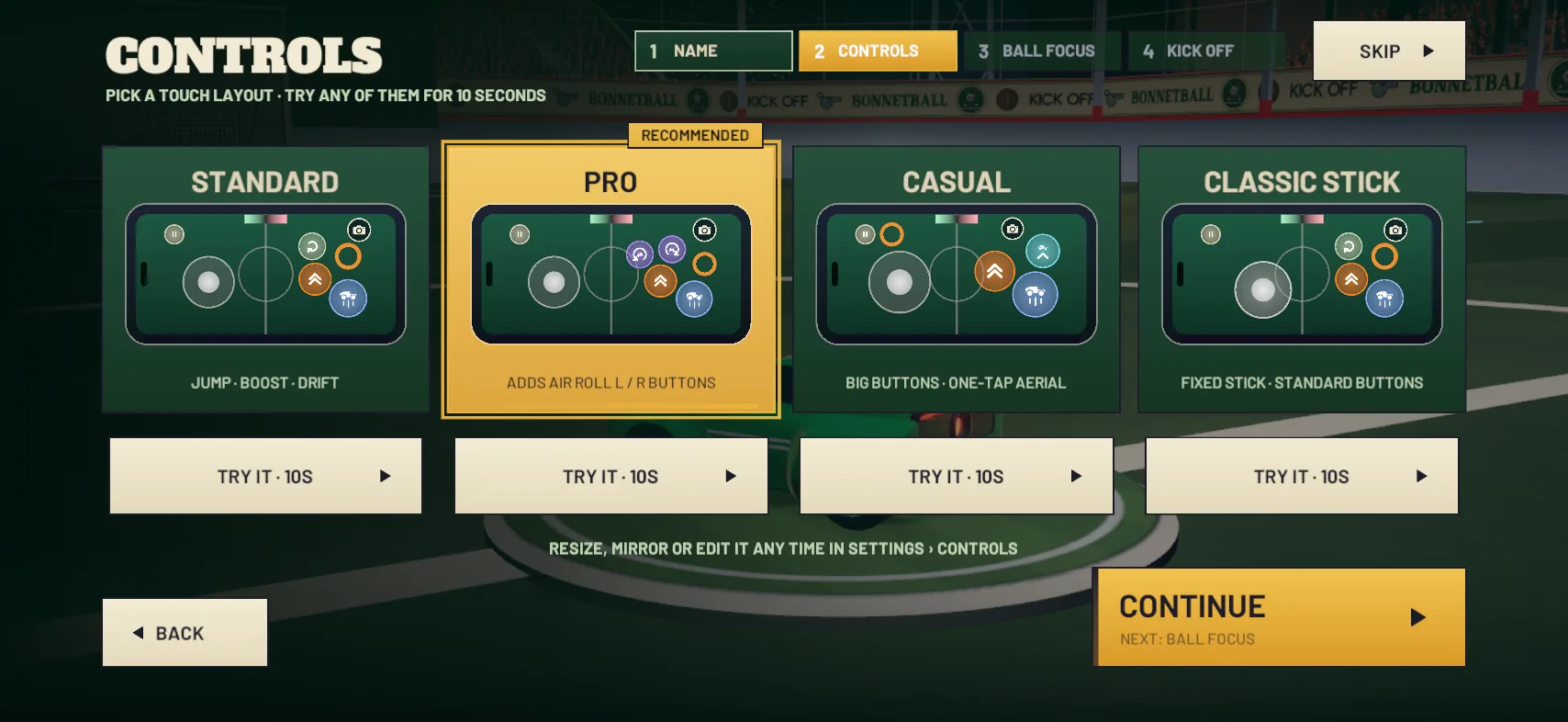
The CONTROLS screen: STANDARD, PRO, CASUAL and CLASSIC STICK, each with TRY IT

The five touch layouts

All five are in SETTINGS › CONTROLS › LAYOUT › PRESET. CLAW is iPhone-only, so iPad has four.

Layout Buttons Air roll
PRO (default) JUMP, BOOST, ROLL L, ROLL R ROLL L and ROLL R
STANDARD JUMP, BOOST, DRIFT Hold DRIFT and push the stick left or right
CASUAL Big JUMP, BOOST and AERIAL buttons, and a bigger stick None shown (you can add the roll buttons)
CLASSIC STICK JUMP, BOOST, DRIFT, with a FIXED stick Hold DRIFT and push the stick left or right
CLAW JUMP and DRIFT for your right thumb, BOOST top right and the roll buttons top left, for your index fingers ROLL L and ROLL R

With ROLL BUTTONS DRIFT on, as it is by default, the roll buttons drift on the ground and roll the car in the air. Button captions only show for your first three matches.

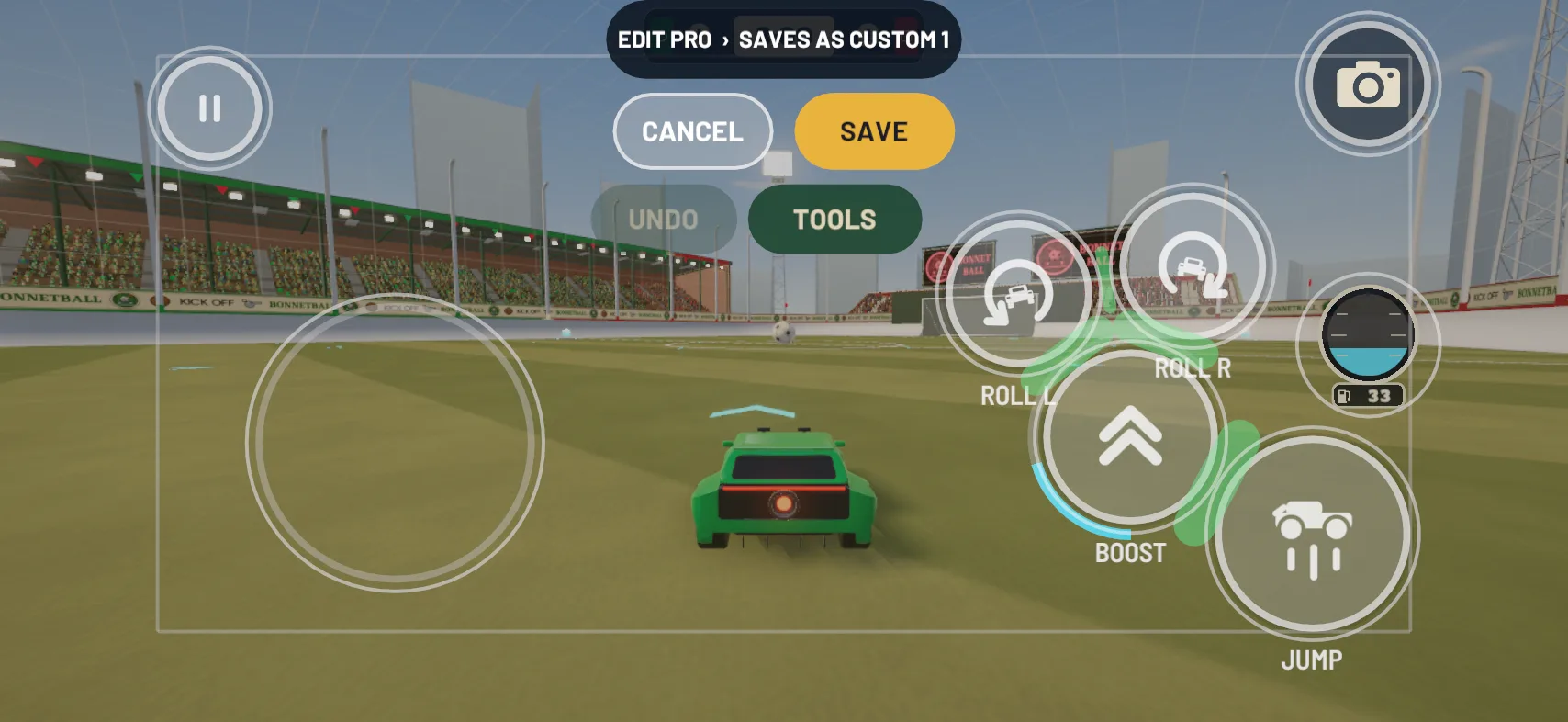
The PRO layout in the layout editor: joystick on the left; jump, boost and the ROLL L and ROLL R buttons on the right

Which layout should I pick?

  • PRO if you want air roll on its own buttons. It’s the RECOMMENDED pick on the first-run CONTROLS page.
  • CASUAL while you’re learning. Pick it and the game offers TURN ON SWIPE TO FLIP (more in how to flip and double jump).
  • STANDARD if you’d rather have a DRIFT button than roll buttons.
  • CLASSIC STICK if you want the stick to stay in one place. The game offers USE CLASSIC STEERING with it.
  • CLAW if you hold your iPhone with thumbs and index fingers. It isn’t on the first-run page, only in SETTINGS.

Which steering should I use?

STEERING sits on SETTINGS › CONTROLS › SCHEME and works with any layout. With DIRECT, the default, THE CAR DRIVES TOWARD WHERE YOU PUSH THE STICK ON SCREEN, and it drifts by itself for sharp turns at speed (more in how to powerslide). With CLASSIC, LEFT AND RIGHT TURN THE CAR, LIKE A CONTROLLER. TILT is experimental: you turn the phone like a wheel, with CALIBRATE and FULL LOCK on its own CONTROLS › TILT page. Start on DIRECT.

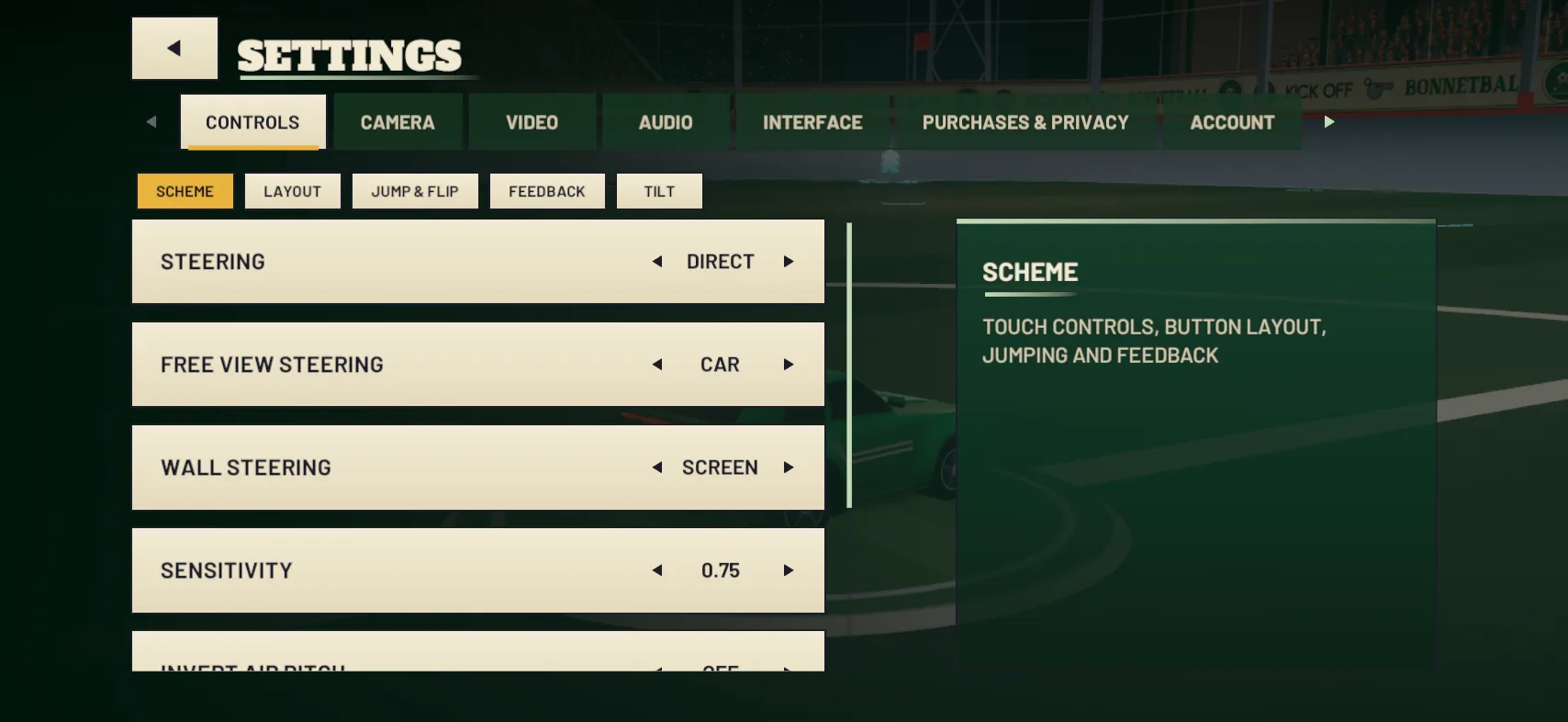
Settings › Controls › Scheme: steering, free-view steering, wall steering and sensitivity

How to edit your layout, step by step

  1. Set the basics. On the LAYOUT page: HANDED (RIGHT or LEFT), BUTTON SIZE (85% to 130%, scaling every button together) and OPACITY.
  2. Open the editor in a match. Pause, then SETTINGS › CONTROLS › LAYOUT › EDIT LAYOUT. The row only appears during a match, and the editor opens over the frozen game.
  3. Move and resize. Tap a control to select it, drag to move it and pinch to resize. Each has SIZE, OPACITY and TOUCH AREA, and red rings flag problems such as HITS THE SCOREBOARD.
  4. Add hidden buttons. Open TOOLS and drag a control from the HIDDEN tray onto the screen: FLIP, AERIAL, DRIFT or the roll buttons, depending on your layout.
  5. TEST it. TEST lights up whatever each touch would press, while the car stays frozen.
  6. SAVE. The built-in layouts never change, so your version goes into a CUSTOM slot.
The layout editor during a match: EDIT PRO, saves as CUSTOM 1, with CANCEL, SAVE, UNDO and TOOLS

CUSTOM layouts and share codes

There are three slots, CUSTOM 1 to CUSTOM 3. A save goes to the slot you’re editing or the first free one, and when all three are full it replaces CUSTOM 3. To share a layout, tap COPY CODE in TOOLS: it copies a code starting BB1: to send to a mate. To use someone else’s, copy their code, tap PASTE CODE, then SAVE.

Camera and BALL FOCUS

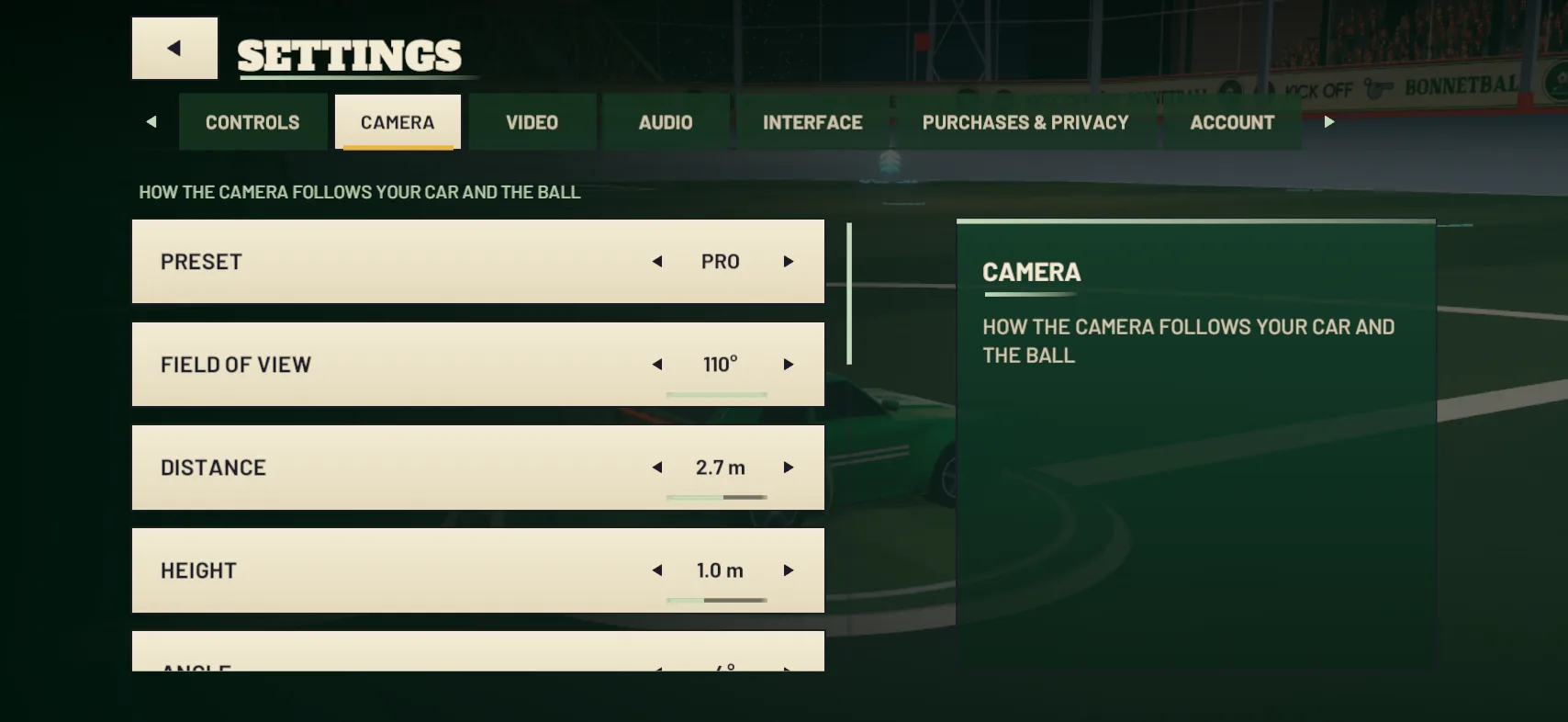
BALL FOCUS ON keeps the ball in view, best for reading the play. BALL FOCUS OFF looks where your car points, which the game suggests for aerials and dribbles. Tap the icon top right to switch it, or set FOCUS BUTTON to HOLD. The CAMERA settings page has three presets: PRO (the default), CLOSE (nearer the car, with a narrower view) and WIDE (further back and higher up).

Settings › Camera: preset, field of view, distance and height

Can I play with a controller?

Yes. The left stick steers, the triggers drive and reverse, the bottom button jumps and the right button boosts. Hold the left button to drift, or to air roll with the stick; the shoulder buttons air roll left and right, and the top button switches BALL FOCUS. Buttons can’t be remapped, and the touch controls stay on screen. The full list is on the controls page.

Practise it

After any change, try it in Free Play before a real match. Then run TRAINING › ADVANCED DRILLS › AIR ROLL, which asks you to HOLD ROLL L (OR DRIFT + STICK LEFT): a quick check that your roll buttons are within reach. The air roll guide covers the rest.

Common mistakes

  • Missing buttons under pressure. Fix: raise BUTTON SIZE, or give the button more TOUCH AREA in the editor.
  • Jumping by accident. By default, a thumb sliding onto JUMP counts as a press. Fix: set JUMP SLIDE-IN to STRICT or OFF in SETTINGS › CONTROLS › JUMP & FLIP.
  • Forgetting to SAVE after PASTE CODE. A pasted layout isn’t kept until you do.

Left-handed? Set HANDED to LEFT before you open the editor: it MIRRORS THE WHOLE LAYOUT FOR LEFT-HANDED PLAY.

Updated 20 October 2026

All guides
  • GUIDE · BEGINNER · 4 MIN

    How to play BonnetBall: a beginner’s guide

    New to car football? How a match works, what happens in your first game against the bots, and which moves to learn first.

  • GUIDE · BEGINNER · 4 MIN

    How to win kickoffs

    Hold BOOST all the way and flip into the ball when you’re close. How kickoffs work, the times the KICKOFFS drill asks for and why bots beat you to it.

  • GUIDE · BEGINNER · 3 MIN

    How boost works: pads, the tank and when to save it

    A full tank lasts about three seconds. Where the 34 boost pads are, what each one gives, what TOP SPEED means and when to keep boost in reserve.