GUIDE · BEGINNER · 4 MIN READ

How to play BonnetBall: a beginner’s guide

New to car football? How a match works, what happens in your first game against the bots, and which moves to learn first.

To play car football, drive your car into the ball and knock it into the other team’s goal, while keeping it out of yours. In BonnetBall you hold BOOST to go faster, tap JUMP to leave the ground, and tap JUMP twice with the stick pushed to flip into the ball for a harder hit. A standard match lasts three minutes, and whoever has more goals at the end wins.

The first-look video shows the whole game in under a minute.

BonnetBall first look: car football on your phone · 0:51 · transcript on the video page

How a match works

  • Teams. Green is HOME and red is AWAY. You drive one car and bots fill every other seat, from 1v1 up to 3v3 (and 4v4 on the HIGH graphics setting). Every match is offline.
  • The clock. A standard match is 3:00. After each kickoff the clock stays frozen until someone touches the ball, and the game calls out when there are 30 seconds left.
  • Goals. The whole ball has to cross the line. After a goal there’s a short pause, then everyone lines up for the next kickoff.
  • The ball must land. At 0:00 the match isn’t over until the ball touches the ground, and the screen says BALL MUST LAND. A ball already in the air can still go in.
  • Overtime. Level at full time? The match goes to sudden-death OVERTIME, with no time limit. The next goal wins it.

Your first match, step by step

  1. Pick a touch layout. The CONTROLS page offers STANDARD, PRO, CASUAL and CLASSIC STICK, and TRY IT gives you 10 seconds with each. PRO is the default and carries the RECOMMENDED tag. You can switch any time in SETTINGS › CONTROLS.
  2. Choose BALL FOCUS. With BALL FOCUS ON, the camera keeps the ball in view, which the game calls best for reading the play. Leave it on while you learn. The icon at the top right switches it during a match.
  3. Play First Steps. Six short steps: DRIVE TO THE CONES, BOOST TO THE PAD, JUMP, DOUBLE JUMP, FRONT FLIP INTO THE BALL and SCORE A GOAL. Each one shows a hint if you get stuck, and RETRY and SKIP sit at the side.
  4. Play your first match. It’s 1v1 against a PARK bot, the gentlest level. Chase the ball, hit it towards their goal, and drive back when it heads towards yours.
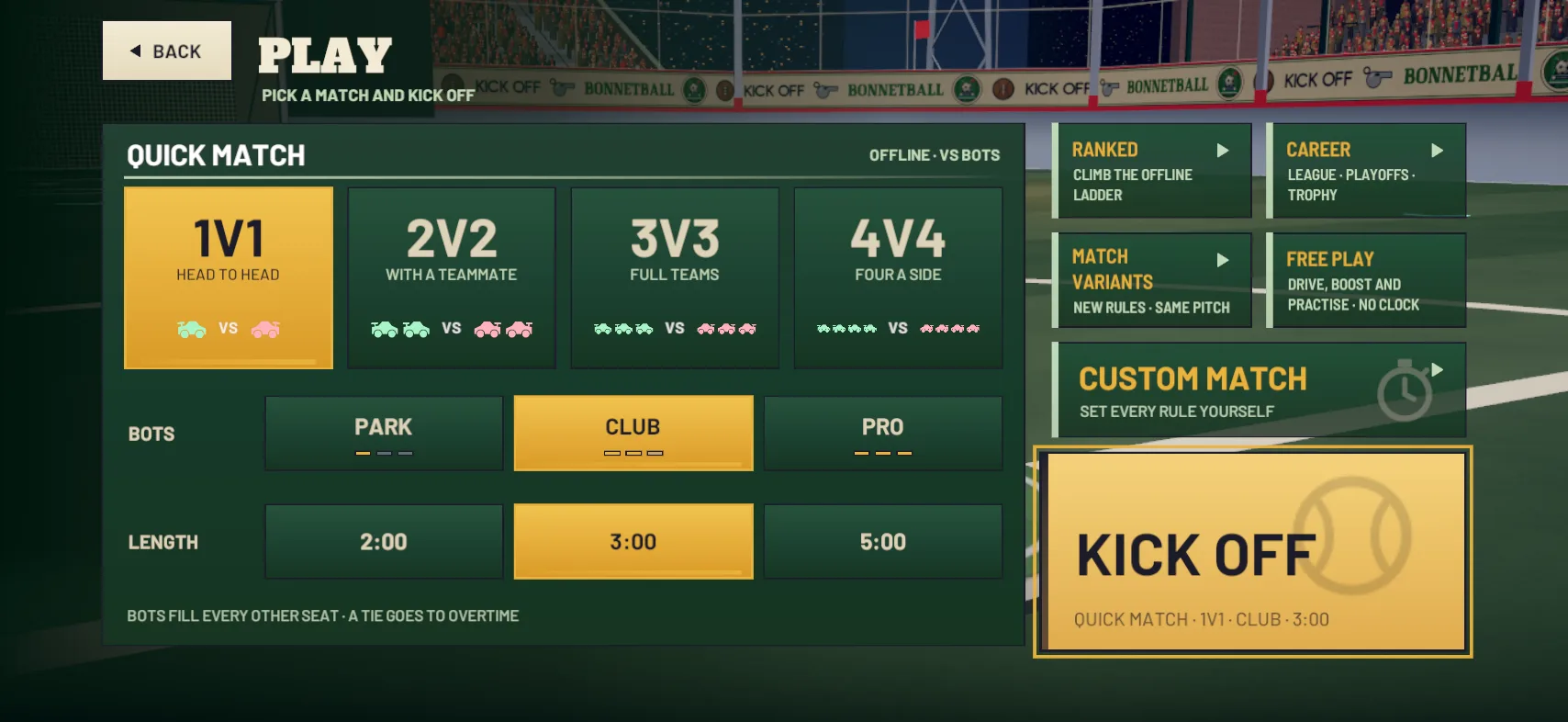
The PLAY screen: QUICK MATCH with 1V1 to 4V4, bot level and length, next to Ranked, Career, Match Variants, Free Play and Custom Match

Quick matches: picking your bots

After that, the KICK OFF tile on the PLAY screen starts a quick match. Choose a TEAM SIZE (1V1 HEAD TO HEAD, 2V2 WITH A TEAMMATE or 3V3 FULL TEAMS), the BOTS level (PARK, CLUB or PRO) and the LENGTH (2:00, 3:00 or 5:00). The level you pick applies to your teammates as well as your opponents, and a tie always goes to overtime.

PARK bots react slowly and never go up for aerials. CLUB bots flip into their shots, double jump and fly. PRO bots do all of that, faster and sharper. Stay on PARK until you’re winning comfortably, then step up. Custom matches, the career and the ranked ladder are on the modes page.
What should I learn first?

Roughly in this order:

After those come the walls, aerials and air roll, then 1v1 tips for winning head to head and rotation for 2v2 and 3v3. If the buttons don’t feel right, start with picking and editing your layout, and if the view is the problem, try the camera settings.

Practise it

Everything lives under TRAINING on the main menu:

  • First Steps, as many times as you like.
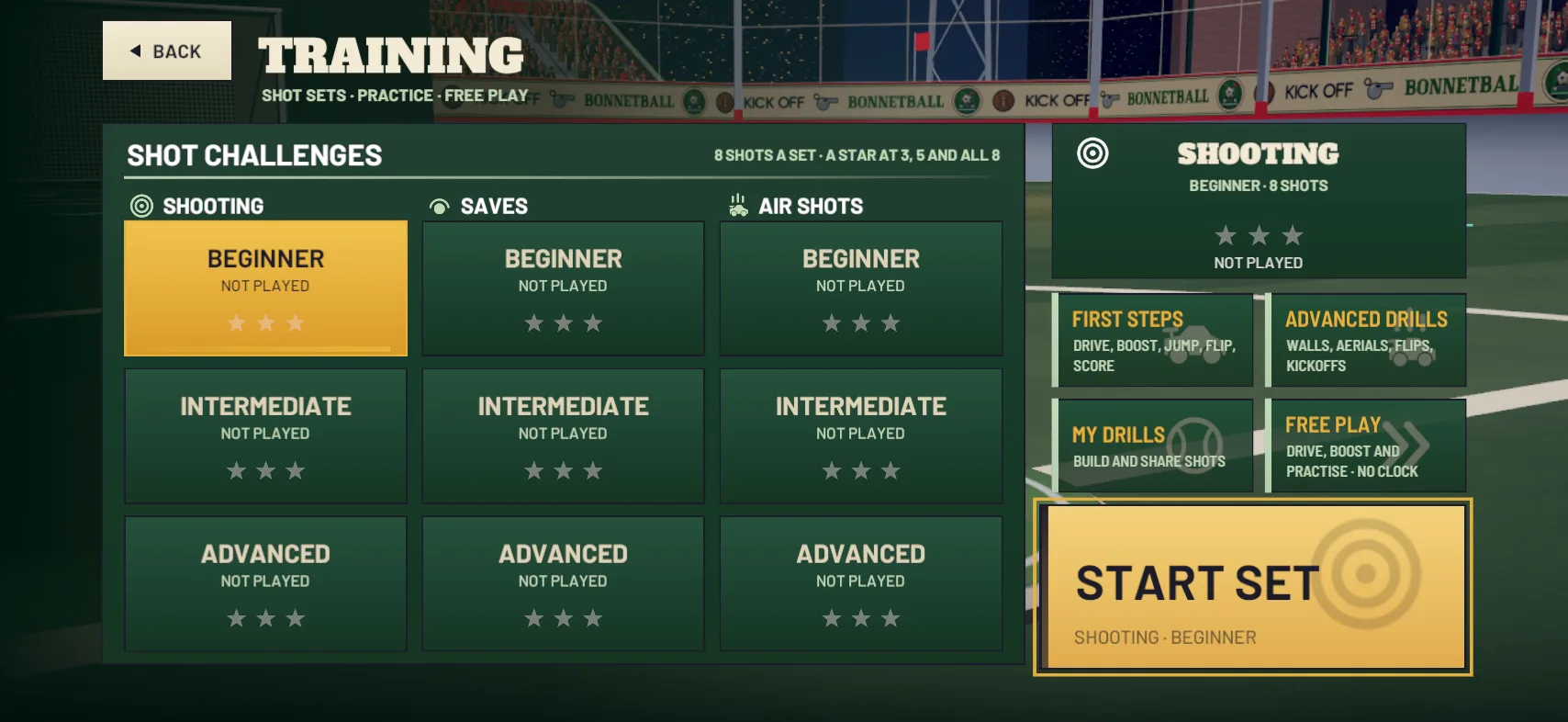
  • SHOT CHALLENGES in three categories, SHOOTING, SAVES and AIR SHOTS, each at BEGINNER, INTERMEDIATE and ADVANCED. A set is 8 shots, with a star at 3, 5 and all 8.
  • ADVANCED DRILLS: six guided lessons, WALL DRIVING, AERIALS, AIR ROLL, HALF FLIP, RECOVERY and KICKOFFS.
  • Free Play: just you and the ball, with no clock and no bots. The toolbar has RESET BALL, BALL TO ME, UNLIMITED BOOST and REWIND.

Free Play and training aren’t recorded with your finished matches, so mess about as much as you like.

TRAINING: shot challenges for shooting, saves and air shots, each at BEGINNER, INTERMEDIATE and ADVANCED, with First Steps, Advanced Drills, My Drills and Free Play

Common mistakes

  • Chasing the ball everywhere. Diving in from the wrong side leaves your goal empty. Fix: when you’re the last one back, stay between the ball and your goal.
  • Running on empty. Fix: drive over the small pads as you go, and use the corner pads to fill up.
  • Ending up on your roof. Fix: tap JUMP and the car rights itself straight away.
  • Flipping too early. Fix: wait until you’re nearly on the ball before the second tap.

Do all the cars handle the same?

Yes. In the game’s own words: EVERY CAR BODY HANDLES THE SAME: PICK THE SHAPE THAT SUITS YOUR TOUCHES. Speed, boost and jumps are identical, and only the shape that meets the ball changes. Pick whichever you like the look of in the garage.

Lost the ball? Keep BALL FOCUS on, and leave BALL ARROW switched on in the camera settings: an arrow at the edge of the screen points to the ball whenever it’s out of view.

Updated 20 October 2026

All guides
  • GUIDE · BEGINNER · 3 MIN

    How boost works: pads, the tank and when to save it

    A full tank lasts about three seconds. Where the 34 boost pads are, what each one gives, what TOP SPEED means and when to keep boost in reserve.

  • GUIDE · BEGINNER · 4 MIN

    How to flip and double jump

    Tap JUMP twice: stick centred for a double jump, stick pushed to flip that way. The timing, the settings that help and the FLIP button you can add.

  • GUIDE · BEGINNER · 4 MIN

    How to hit a power shot

    For your hardest shots, flip into the ball: boost at it, tap JUMP just before you reach it, then push the stick up and tap JUMP again.